If you’ve recently upgraded your PC, laptop, or workstation with a faster, higher-capacity SSD, you might be wondering what to do with the old one. But don’t toss it away just yet, as your spare SSD could still have plenty of life left. With the right tools, you can repurpose that SSD into an external storage device.
Whether you're a DIY tech enthusiast who loves repurposing hardware, a gamer looking for extra game storage, or a budget-conscious user aiming to maximize value, turning your previous SSD into external storage is a fun and cost-effective solution. From game libraries and media files to backups and portable workspaces, external SSDs can be very versatile.
Even if your old SSD is worn out and you don’t plan to use it, securely erasing it is a smart move to protect your private data. SSDs can retain information even when failing, so having a way to hook up the drive after removing it from your PC can be a simple but powerful way to safeguard your privacy.
The benefits of external storage
External storage is an easy and portable way to store your files. Connected on the outside of your device, an external storage drive allows you to back up and move all your files from one computer to another. External drives are available to buy; however, you might already have what you need to build your own with a little bit of DIY. Let’s look at some of the benefits:
- Instead of letting your old SSD gather dust, repurposing it gives it a second life, maximizing your initial investment.
- An external SSD is compact, durable, and easy to carry, which is perfect for moving large files between systems or expanding storage on your laptop or gaming console.
- Speaking of gaming consoles, gamers can use external SSDs to store and play less frequently used titles or offload large game libraries, especially on PCs, laptops, or even supported consoles.
- You can use your repurposed SSD to back up your important data, clone your current drive, or create a recovery drive, making system maintenance and troubleshooting more streamlined.
The difference between enclosures, adapters and docking stations
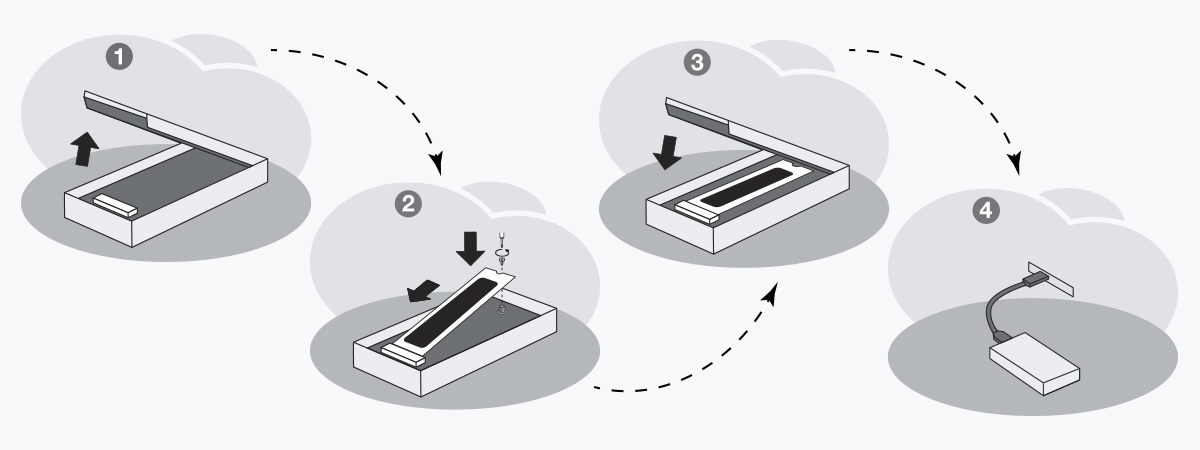
SSD enclosures are external cases that house an SSD, offering both data connectivity and physical protection. These are ideal for turning an internal SSD into a portable one that you can take with you anywhere. They typically connect via USB or Thunderbolt.
SSD adapters on the other hand are lightweight devices that convert one interface type to another, such as SATA to USB, without fully enclosing the drive. These are ideal for quick data transfers or temporary access but lack durability and protection, making them less portable than an enclosure. Very rarely an adapter will fit inside an enclosure along with the drive, and it is often hard to tell until you have acquired each piece and tried to make them work together. You can avoid this frustration by finding an enclosure that comes with its own connection.
Docking stations are meant to be temporary mounting solutions for tasks like transferring files or entire volumes. They sometimes have more than one type of connections (such as SATA along with M.2 NVMe). They are handy for these tasks, but are not robust enough to serve as a permanent enclosure.